InstaPrime
InstaPrime app lets you give more awesome features on your Android device.
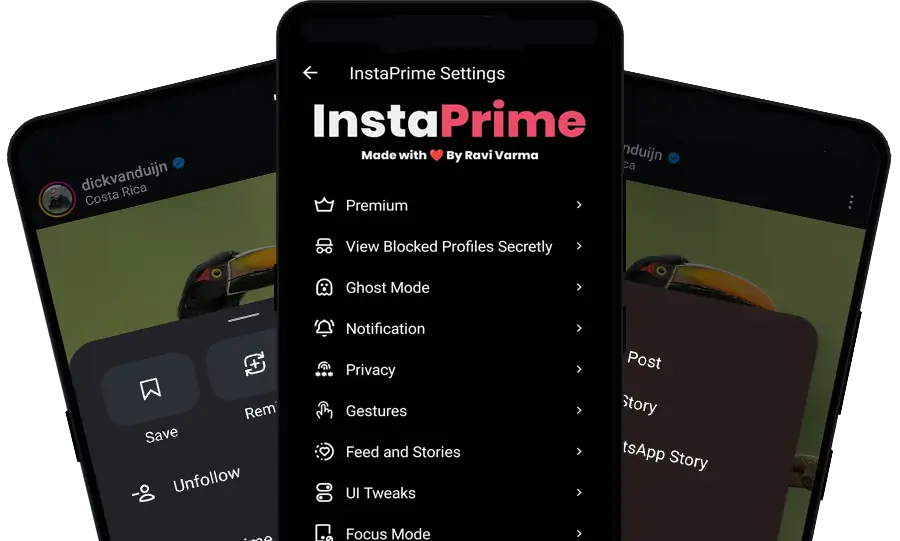
How do I access settings?
Long press on the home button at the bottom of the screen.
About
InstaPrime is an updated version of the most popular social media platform. It offers users access to the security and privacy features. That means you can use Insta without giving much info and keep your profile confidential.
It implies safe browsing of the Insta feed, videos, and reels. Ravi Varma is the lead developer of the InstaPrime team. He is just a college student and started this project for a small group of people. Now, it spreads across the world as it solves major problems of the users. Read more about him in about page.
App Info
| Name | InstaPrime |
| Version | 7.2 |
| Base | 435.0.0.37.76 |
| Size | 147 MB |
| Developer | Ravi Varma |
| Updated on | August 01, 2026 |
Features
Customisation
You can change the look of the InstaPrime app. The UI customisation feature will help you do that.
Long Video Splitter
This feature helps you to make multiple short videos. Just upload it as a story, and choose which part of the video is suitable for you.
Developer options
Access to the experimental features. Just press and hold the Home button to find the developer options.
Downloads
One of the finest options that gives a user freedom. Download Reels, Photos and Videos of your favourite person’s profile without needing their party application.
OTA Update
InstaPrime offers an OTA Update to easily get the latest version. Or you can visit us for the latest official version.
View Blocked Profiles secretly
If someone blocked you, you can still see their activities like stories, posts and reels. However, you need a premium membership to activate this feature.
Ghost Mode
You can also call it anonymous mode.
Mark as seen after the reply
The sender will see “seen” only after you reply.
Secret view story
You can view other stories anonymously. It won’t show that you’ve seen their story.
Secret read messages
Read messages of others that have been sent to you without letting them know.
Secret Typing
When you enable this option, the others won’t know that you are typing or replying to their messages.
Secret view live stream
Watch a live stream without letting the streamer know that you are watching.
Secret Screenshot
Don’t tell anyone that you took the screenshot in the chats. (e.g., view once, vanish mode, and disappearing mode)
Listen to voice notes secretly
Once you receive the voice messages, you can listen to them in secret.
Anti-reply image
Don’t tell anyone that your reply is viewing.
Anti-view once
“Once view” image/video can be seen multiple times.
Anti-reply photo/video
Don’t tell anyone that you have replyed their photo and video.
Hide media in chats
You will not see photos or videos in chats. Disable it when you want to see the media in chats.
Notifications
Filter by Message Type:
Disable filter notifications
This option will disable filter notifications based on message types.
Filter Notifications
You can block specific notifications based on message type. (You don’t need to mute messages)
Filter by Keywords:
Disable filter notification
This option will disable notifications based on keywords.
Filter Notifications
You can block specific notifications based on keywords. (Note: You don’t need to mute messages)
Privacy
Disable Ads
Get an ad-free experience with InstaPrime in feed, reels, explore and other places.
Disable Analytics Tracker
It protects your privacy. When you enable this option, you won’t give any data to Instagram.
Private Screen Mode
This is an exclusive mode which prevents people from peeping at your screen while scrolling the InstaPrime app.
Hide “Hidden Chats” Menu
You can hide the “hidden chats” in the menu section. Disable this option to show “Hidden chats”.
Show Notifications
Just a notification will be shown; however, the sender’s name and message name will be hidden.
Set Password lock to hide chat
Option to secure your chats, now, you can set the passcode to lock hidden chats. That means only you can unlock it.
Show all hidden chats
This will show all hidden chats in the list.
Gestures
InstaPrime has gesture control to prevent accidental touches and restrict your usage.
Disable Reels Scrolling
You want to restrict your “Reels” scrolling. Just enable this option to disable Reels scrolling.
Disable Accidental Swiping
This option helps you prevent Swipe-to-refresh on Reels from accidentally happening.
Disable double-tap to like
Double-tapping to like will be disabled on Reels, Posts, and Comments.
Disable swipe to navigate
This option will disable swipe left and right navigation tabs.
Feed and Stories
Filter Feed by Following
Only you can see the posts of your followed accounts.
Disable Suggested Reels
You didn’t get to see the suggested Reels on your feed.
Copy Caption without Hashtags
You can copy captions without hashtags.
Repost with Caption
This option will enable you to repost with a caption in WhatsApp Story.
Disable Comments options
This option will disable comments options from comments.
Disable Split Video
This option will disable splitting a long video into parts while posting on WA Story.
Disable Auto Play
You can disable auto-play videos on Feed.
Enhance Photo Quality
You can see the high-quality photo on your feed.
Disable Auto Play Next Story
This option prevents the next story from being opened automatically.
Enhance Story Upload Quality
You can upload the maximum quality of your story.
Force play sound
This option will force the sound in stories by default.
Change Mention indicator style.
You can select the indicator styles you need.
UI Customisation
Make your own style with available options.
Set Background Image
Choose your favourite background image for the chats.
Choose Emoji Type
Facebook, Joy Pixel, Samsung, and iOS emojis are available to apply.
Font Type
You can apply iOS fonts or custom fonts. And Creative fonts for DMs.
App Startup Tap
Choose which tab should be opened when you open the InstaPrime.
Focus Mode
In other words, this helps you concentrate on one thing.
Hide Stories Section
Stories won’t show on your feed.
Hide Feeds Section
No feeds will be shown in the Feed section.
Hide Reels Section
The Reels option will be removed, and decrease your brain rot.
Hide Explore Section
This option removes the explore from the feed.
Hide all comments
No comments will be shown in the comments section.
Profile Features
Copy bio
You can copy the biography of other profiles.
View Profile Picture
You can view and download the profile pictures of people.
Save Bio
You can save the bio and see it through the Miscellaneous tab.
Translate Bio
If someone is from another country and they create a bio in their language, just hit the translate button to read it in English.
Frequently Asked Questions
What is InstaPrime?
InstaPrime is a modified version of Instagram for Android that brings exclusive features like downloading Reels, an ad-free experience, Ghost Mode, Developer Options and Privacy features.
Is InstaPrime safe to use?
Yes, it is safe to use. The developer Ravi Varma is a reputed person in the GitHub community.
What is Premium?
There are a few features that can be unlocked with the premium membership.
How to get a premium?
There are two ways to become a premium InstaPrime user. One is with direct payment, and the other is with watching ads.
How to get InstaPrime on my iPhone?
It is not possible right now as InstaPrime is only available for Android.
How to copy a profile ID?
Go to profile >> Settings Icon >> Copy profile ID.
What is a 32-bit version?
It is also known as the ARM7 version.
What is a 64-bit version?
It is also known as the ARM8 version.
Our FAQ page will clear your doubts.